


Overview
Hardware Specifications
| Parameter | Specification |
|---|---|
| Model | MC206 |
| Brand | Bachmann |
| Module Type | CPU Processor Module |
| Processor | Single-core, 600 MHz |
| RAM | 1 GB DDR4 |
| Non-volatile RAM | 512 kB nvRAM |
| File Flash | 2 GB pSLC |
| Ethernet | 2 x Ethernet, 100/1000 Mbps |
| Serial Interfaces | 1 x RS232; 1 x RS232/422/485 |
| USB | 1 x USB 3.0 |
| Security | TPM |
| Storage Interface | CFast slot |
| Origin | Austria |
| Weight | 0.55 kg |
| Dimensions | 11 x 5.3 x 11.8 cm (estimated shipping size) |
Processor, Memory and Communication Interfaces
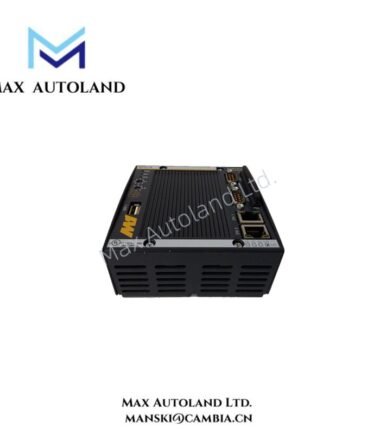
The MC206 combines a 600 MHz single-core processor with DDR4 working memory and non-volatile storage. The 512 kB nvRAM and 2 GB pSLC file flash provide separate storage resources; their specific application allocation depends on the controller configuration.
The two Ethernet interfaces support 100/1000 Mbps connections. The RS232 interface supports serial communication, while the RS232/422/485 interface provides multiple electrical interface options. The selected serial standard and wiring must match the connected equipment.
The USB 3.0 interface and CFast slot provide additional connectivity and storage options. The module also incorporates a Trusted Platform Module (TPM). Specific security functions and supported software configurations require confirmation against the applicable Bachmann documentation.
Frequently Asked Questions
Q: What processor and memory resources does the MC206 provide?
A: It uses a 600 MHz single-core processor, 1 GB DDR4 RAM, 512 kB nvRAM, and 2 GB pSLC file flash.
Q: Which communication interfaces are available?
A: The module provides two 100/1000 Mbps Ethernet interfaces, one RS232 interface, one RS232/422/485 interface, and one USB 3.0 interface.
Q: Can the MC206 replace another Bachmann CPU module directly?
A: Direct replacement compatibility cannot be confirmed from the supplied specifications alone. Verify controller hardware compatibility, firmware requirements, configuration data, and interface assignments before replacement.
Field Installation Guidelines
- Verify the MC206 model designation and controller compatibility before installation.
- Isolate the relevant power sources and follow the equipment manufacturer’s shutdown procedures before removing or installing the module.
- Use the designated mounting position and approved retention mechanism specified in the Bachmann hardware documentation.
- Connect Ethernet and serial cables according to the selected interface standard and the connected device’s pin assignments.
- For RS232/422/485 connections, verify the electrical interface selection, signal wiring, and termination requirements before applying power.
- Route communication cables separately from high-voltage and high-current conductors where practicable to reduce electromagnetic interference.
- Confirm the approved CFast media type and file-system requirements before using removable storage.
- After installation, inspect the connections and verify controller startup, communication links, and application status using the approved commissioning procedure.
Bachmann Top Products
Customers Also Viewed
| Bently Nevada | ABB | Yokogawa | Woodward | Schneider |
| 133835-02 | SPDSM04 | CP451-10 | 5463-785 | 140CPU65150 |
| 135321-01 | SPIEET800 | CP461 | 5437-672 | BMEXBP0400 |
| 135322-01 | SPINIET800 | CP461-50 | 9907-175 | 140CPU67160 |
| 136751-01 | SPNLK01 | CP451-11 | 5466-355 | 170FNT11001 |
| 136751-02 | SPSED01 | CP701 S1 | 5466-257 | 170ADO34000 |
| 184139-10 | SPSEM11 | CP345 S1 | 5466-1049 | 170ADM35010 |
| 82362-01 | SPSET01 | SCP461-11 S1 | 5501-381 | 170ADI34000 |
| 84134-01 | SPTKM01 | CP451-10 S2 | 8200-177 | 140ARI03010 |
| 87900-02 | SPTPS02 | CP401-10 | 8200-205 | BMXCPS4002 |
| 89998-01 | SPTPS13 | NFCP100-S00 | 9907-029 | 140CRP93200 |



Reviews
There are no reviews yet.